Project Item State Saving Sample (S08)
Overview
In this section, as a sample related to Project Item State Saving, we present an improvement of Project Item Property Implementation Sample (S07) that enables saving item states to project files. This improvement allows positions and properties recorded in BodyPositionItem to be saved and restored as a project.
Source Code
This sample’s source code adds the store and restore functions introduced in State Store/Restore Functions to the code from Project Item Property Implementation Sample (S07). The file structure is the same. Below we show the BodyPositionItem class header and implementation files with the added functions. Most of the source code is the same as S07, with changes highlighted with comments. DevGuidePlugin.cpp and CMakeLists.txt have the same content as S07.
BodyPositionItem.h
#ifndef DEVGUIDE_PLUGIN_BODY_POSITION_ITEM_H
#define DEVGUIDE_PLUGIN_BODY_POSITION_ITEM_H

#include <cnoid/Item>
#include <cnoid/RenderableItem>
#include <cnoid/BodyItem>
#include <cnoid/SceneGraph>
#include <cnoid/SceneDrawables>
#include <cnoid/Selection>

class BodyPositionItem : public cnoid::Item, public cnoid::RenderableItem
{
public:
    static void initializeClass(cnoid::ExtensionManager* ext);

    BodyPositionItem();
    BodyPositionItem(const BodyPositionItem& org);
    void storeBodyPosition();
    void restoreBodyPosition();
    virtual cnoid::SgNode* getScene() override;
    void setPosition(const cnoid::Isometry3& T);
    const cnoid::Isometry3& position() const { return position_; }
    bool setFlagHeight(double height);
    double flagHeight() const { return flagHeight_; }
    enum ColorId { Red, Green, Blue };
    bool setFlagColor(int colorId);
    double flagColor() const { return flagColorSelection.which(); }

protected:
    virtual Item* doDuplicate() const override;
    virtual void onTreePathChanged() override;
    virtual void doPutProperties(cnoid::PutPropertyFunction& putProperty) override;
    // Added the following two functions
    virtual bool store(cnoid::Archive& archive) override;
    virtual bool restore(const cnoid::Archive& archive) override;

private:
    void createFlag();
    void updateFlagPosition();
    void updateFlagMaterial();

    cnoid::BodyItem* bodyItem;
    cnoid::Isometry3 position_;
    cnoid::SgPosTransformPtr flag;
    double flagHeight_;
    cnoid::Selection flagColorSelection;
    cnoid::SgMaterialPtr flagMaterial;
};

typedef cnoid::ref_ptr<BodyPositionItem> BodyPositionItemPtr;

#endif // DEVGUIDE_PLUGIN_BODY_POSITION_ITEM_H
BodyPositionItem.cpp
#include "BodyPositionItem.h"
#include <cnoid/ItemManager>
#include <cnoid/MeshGenerator>
#include <cnoid/EigenUtil>
#include <cnoid/PutPropertyFunction>

// Added the following headers
#include <cnoid/Archive>
#include <cnoid/EigenArchive>

#include <fmt/format.h>

using namespace std;
using namespace fmt;
using namespace cnoid;

void BodyPositionItem::initializeClass(ExtensionManager* ext)
{
    ext->itemManager()
        .registerClass<BodyPositionItem>("BodyPositionItem")
        .addCreationPanel<BodyPositionItem>();
}

BodyPositionItem::BodyPositionItem()
{
    bodyItem = nullptr;
    position_.setIdentity();
    flagColorSelection.setSymbol(Red, "red");
    flagColorSelection.setSymbol(Green, "green");
    flagColorSelection.setSymbol(Blue, "blue");
    flagColorSelection.select(Red);
    flagHeight_ = 1.8;
}

BodyPositionItem::BodyPositionItem(const BodyPositionItem& org)
    : Item(org)
{
    bodyItem = nullptr;
    position_ = org.position_;
    flagHeight_ = org.flagHeight_;
    flagColorSelection = org.flagColorSelection;
}

Item* BodyPositionItem::doDuplicate() const
{
    return new BodyPositionItem(*this);
}

void BodyPositionItem::onTreePathChanged()
{
    auto newBodyItem = findOwnerItem<BodyItem>();
    if(newBodyItem && newBodyItem != bodyItem){
        bodyItem = newBodyItem;
        mvout()
            << format("BodyPositionItem \"{0}\" has been attached to {1}.",
                      name(), bodyItem->name())
            << endl;
    }
}

void BodyPositionItem::storeBodyPosition()
{
    if(bodyItem){
        position_ = bodyItem->body()->rootLink()->position();
        updateFlagPosition();
        mvout()
            << format("The current position of {0} has been stored to {1}.",
                      bodyItem->name(), name())
            << endl;
    }
}

void BodyPositionItem::restoreBodyPosition()
{
    if(bodyItem){
        bodyItem->body()->rootLink()->position() = position_;
        bodyItem->notifyKinematicStateChange(true);
        mvout()
            << format("The position of {0} has been restored from {1}.",
                      bodyItem->name(), name())
            << endl;
    }
}

SgNode* BodyPositionItem::getScene()
{
    if(!flag){
        createFlag();
    }
    return flag;
}

void BodyPositionItem::createFlag()
{
    if(!flag){
        flag = new SgPosTransform;
        updateFlagPosition();
        flagMaterial = new SgMaterial;
        updateFlagMaterial();
    } else {
        flag->clearChildren();
    }

    MeshGenerator meshGenerator;

    auto pole = new SgShape;
    pole->setMesh(meshGenerator.generateCylinder(0.01, flagHeight_));
    pole->getOrCreateMaterial()->setDiffuseColor(Vector3f(0.7f, 0.7f, 0.7f));
    auto polePos = new SgPosTransform;
    polePos->setRotation(AngleAxis(radian(90.0), Vector3::UnitX()));
    polePos->setTranslation(Vector3(0.0, 0.0, flagHeight_ / 2.0));
    polePos->addChild(pole);
    flag->addChild(polePos);

    auto ornament = new SgShape;
    ornament->setMesh(meshGenerator.generateSphere(0.02));
    ornament->getOrCreateMaterial()->setDiffuseColor(Vector3f(1.0f, 1.0f, 0.0f));
    auto ornamentPos = new SgPosTransform;
    ornamentPos->setTranslation(Vector3(0.0, 0.0, flagHeight_ + 0.01));
    ornamentPos->addChild(ornament);
    flag->addChild(ornamentPos);

    auto banner = new SgShape;
    banner->setMesh(meshGenerator.generateBox(Vector3(0.002, 0.3, 0.2)));
    banner->setMaterial(flagMaterial);
    auto bannerPos = new SgPosTransform;
    bannerPos->setTranslation(Vector3(0.0, 0.16, flagHeight_ - 0.1));
    bannerPos->addChild(banner);
    flag->addChild(bannerPos);
}

void BodyPositionItem::updateFlagPosition()
{
    if(flag){
        auto p = position_.translation();
        flag->setTranslation(Vector3(p.x(), p.y(), 0.0));
        auto rpy = rpyFromRot(position_.linear());
        flag->setRotation(AngleAxis(rpy.z(), Vector3::UnitZ()));
        flag->notifyUpdate();
    }
}

void BodyPositionItem::updateFlagMaterial()
{
    if(flagMaterial){
        switch(flagColorSelection.which()){
        case Red:
            flagMaterial->setDiffuseColor(Vector3f(1.0f, 0.0f, 0.0f));
            break;
        case Green:
            flagMaterial->setDiffuseColor(Vector3f(0.0f, 1.0f, 0.0f));
            break;
        case Blue:
            flagMaterial->setDiffuseColor(Vector3f(0.0f, 0.0f, 1.0f));
            break;
        default:
            break;
        }
        flagMaterial->notifyUpdate();
    }
}

void BodyPositionItem::setPosition(const Isometry3& T)
{
    position_ = T;
    updateFlagPosition();
    notifyUpdate();
}

bool BodyPositionItem::setFlagHeight(double height)
{
    if(height <= 0.0){
        return false;
    }
    flagHeight_ = height;
    if(flag){
        createFlag();
        flag->notifyUpdate();
    }
    notifyUpdate();
    return true;
}

bool BodyPositionItem::setFlagColor(int colorId)
{
    if(!flagColorSelection.select(colorId)){
        return false;
    }
    updateFlagMaterial();
    notifyUpdate();
    return true;
}

void BodyPositionItem::doPutProperties(PutPropertyFunction& putProperty)
{
    auto p = position_.translation();
    putProperty("Translation", format("{0:.3g} {1:.3g} {2:.3g}", p.x(), p.y(), p.z()),
                [this](const string& text){
                    Vector3 p;
                    if(toVector3(text, p)){
                        position_.translation() = p;
                        setPosition(position_);
                        return true;
                    }
                    return false;
                });

    auto r = degree(rpyFromRot(position_.linear()));
    putProperty("Rotation", format("{0:.0f} {1:.0f} {2:.0f}", r.x(), r.y(), r.z()),
                [this](const string& text){
                    Vector3 rpy;
                    if(toVector3(text, rpy)){
                        position_.linear() = rotFromRpy(radian(rpy));
                        setPosition(position_);
                        return true;
                    }
                    return false;
                });

    putProperty.min(0.1)("Flag height", flagHeight_,
                [this](double height){ return setFlagHeight(height); });

    putProperty("Flag color", flagColorSelection,
                [this](int which){ return setFlagColor(which); });
}

// Added the following two functions
bool BodyPositionItem::store(Archive& archive)
{
    write(archive, "translation", Vector3(position_.translation()));
    write(archive, "rotation", degree(rpyFromRot(position_.linear())));
    archive.write("flag_height", flagHeight_);
    archive.write("flag_color", flagColorSelection.selectedSymbol());
    return true;
}

bool BodyPositionItem::restore(const Archive& archive)
{
    Vector3 v;
    if(read(archive, "translation", v)){
        position_.translation() = v;
    }
    if(read(archive, "rotation", v)){
        position_.linear() = rotFromRpy(radian(v));
    }
    archive.read("flag_height", flagHeight_);
    string color;
    if(archive.read("flag_color", color)){
        flagColorSelection.select(color);
    }
    return true;
}
Usage
In this sample, when you save a project, the position recorded in BodyPositionItem and the flag height and color properties are saved to the project file. When you reload the saved project, the recorded position, flag height, and color return to the same state as when saved. Please actually perform Saving Projects and Loading Projects operations to confirm the behavior.
For example, as shown in How to Use Properties of Project Item Property Implementation Sample (S07), suppose you load the PA10Pickup project, introduce BodyPositionItem, and set it to the following state:
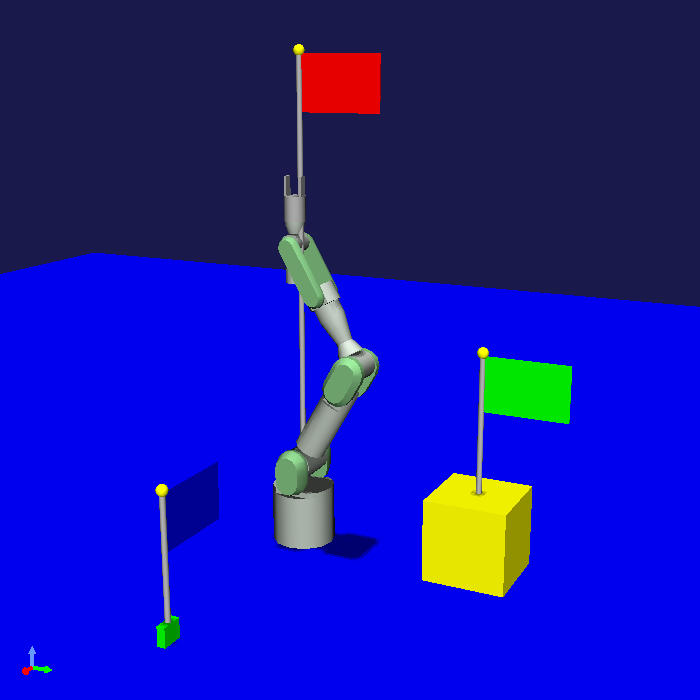
In previous samples, even if you saved the project in this state, when you reloaded it, all recorded positions would return to the origin, and the flag height and color would also return to their default states. This made the introduced BodyPositionItem not very useful. However, in this sample, when you perform the same operation, each BodyPositionItem’s state is restored. Only when state saving and restoration using project files becomes possible like this can users use this function with confidence.
Source Code Explanation
Since the header file only adds function definitions, we’ll explain the added parts of the implementation file.
First,
#include <cnoid/Archive>
enables use of the Archive class. This is needed for implementing the store and restore functions.
#include <cnoid/EigenArchive>
This is a header in the Choreonoid SDK’s Util library that defines functions for linking Eigen matrices and vectors with YAML-Type Structured Data Classes. This is also used in implementing the store and restore functions.
bool BodyPositionItem::store(Archive& archive)
{
    ...
    return true;
}
This is the store function for saving item state to project files. It overrides and implements the virtual function defined in the Item class. It should return true when saving succeeds. Below we explain the code within this function.
write(archive, "translation", Vector3(position_.translation()));
The position recorded in BodyPositionItem is stored in the member variable position_. This is of Eigen’s Isometry3 type, equivalent to a 4x4 homogeneous transformation matrix. Here we write its translation component to archive with the key “translation”. The write function used here is a template function defined in the EigenArchive header, defined as follows:
template<typename Derived>
Listing& write(Mapping& mapping, const std::string& key, const Eigen::MatrixBase<Derived>& x);
This template enables outputting any Eigen matrix/vector type to a Mapping node. In this case, the value corresponding to the key becomes a Listing node containing the vector elements. Written in YAML, this becomes:
translation: [ x, y, z ]
The vector elements are ultimately output in flow style like this.
Note that without using this write function, the same processing can be written as follows:
auto translation = archive.createFlowStyleListing();
translation->append(position_.translation().x());
translation->append(position_.translation().y());
translation->append(position_.translation().z());
Compared to this, you can see that using the EigenArchive write function allows more concise writing.
Next, we output the rotation component of the recorded position with the following code:
write(archive, "rotation", degree(rpyFromRot(position_.linear())));
rpyFromRot is a function defined in the EigenUtil header that takes a 3x3 rotation matrix as input and returns the corresponding roll-pitch-yaw (RPY) rotation components as a three-dimensional vector of Vector3 type. The units of each component in this case are radians, but here we further convert them to degrees using the degree function. (The degree function is also defined in the EigenUtil header.) While we could output in radians as is, we use degrees considering readability when written in YAML. We output that RPY value with the keyword “rotation” using the write function as before.
archive.write("flag_height", flagHeight_);
Using the normal functions of the Mapping type that Archive inherits, we output the value of member variable flagHeight_ with the key “flag_height”.
archive.write("flag_color", flagColorSelection.selectedSymbol());
We output the option selected in member variable flagColorSelection as a string. We could also write this as
archive.write("flag_color", flagColorSelection.which());
to output the index value (integer) of the selected item, but considering clarity when written in YAML, we use a string here.
This completes the state saving. The YAML actually output by this code looks like:
translation: [ 0.9, 0, 0.035 ]
rotation: [ 0, -0, 90 ]
flag_height: 0.5
flag_color: Blue
This is output to the section describing the corresponding item’s state in the project file.
Note
Here we named the keys for flag height and color as “flag_height” and “flag_color”, using “lowercase words separated by underscores.” This is called “snake case” notation. Alternatively, we could use “camel case” notation like “FlagHeight” or “flagHeight”. Choreonoid has traditionally used camel case for YAML descriptions, but recent versions are transitioning to snake case, and we recommend writing keys and symbols in snake case going forward.
Next, we implement the restore function for state restoration:
bool BodyPositionItem::restore(const Archive& archive)
{
    ...
    return true;
}
Here we just need to be able to read the data output by store. First,
Vector3 v;
if(read(archive, "translation", v)){
    position_.translation() = v;
}
reads the translation component of the recorded position. The read function used here is also a template function defined in EigenArchive that reads the value of the specified key as a vector value, opposite to write. If reading succeeds, it returns true, and in that case, we assign the value read into variable v to the translation component of member variable position_.
Without using the EigenArchive function, this would require somewhat complex code like the following:
auto translation = archive.findListing("translation");
if(translation->isValid() && translation->size() == 3){
    for(int i=0; i < 3; ++i){
        position_.translation()[i] = translation->at(i)->toDouble();
    }
}
Next, we read the rotation component with the following code:
if(read(archive, "rotation", v)){
    position_.linear() = rotFromRpy(radian(v));
}
Here, as the reverse process of store, we first convert the read RPY values to radians, obtain the rotation matrix from the RPY values using the rotFromRpy function, and assign it to the rotation component of member variable position_. The radian and rotFromRpy used here are also functions defined in EigenUtil.
archive.read("flag_height", flagHeight_);
Reading the flag height.
string color;
if(archive.read("flag_color", color)){
    flagColorSelection.select(color);
}
Reading the flag color. Since we saved the color as a string, we first read it as a string here accordingly. We then select it in member variable flagColorSelection.
This part can also be written using Mapping’s get function as follows:
flagColorSelection.select(archive.get("flag_color", flagColorSelection.selectedSymbol()));
Unlike the read function, the get function returns the read value as a return value. However, if the key doesn’t exist, it cannot read, so in that case it returns the default value specified as the second argument. Here we specify the current setting value as the default value. Depending on the situation, this function may allow more concise writing.